
For our test interval, Friday 27 November 2026 through Monday 30 November contains four calendar dates and two ordinary weekdays. We then entered Saturday 28 November and Monday 30 November as sample closure dates, with Monday entered twice. The result was one counted business day. Neither a weekend overlap nor a duplicate entry created another subtraction.
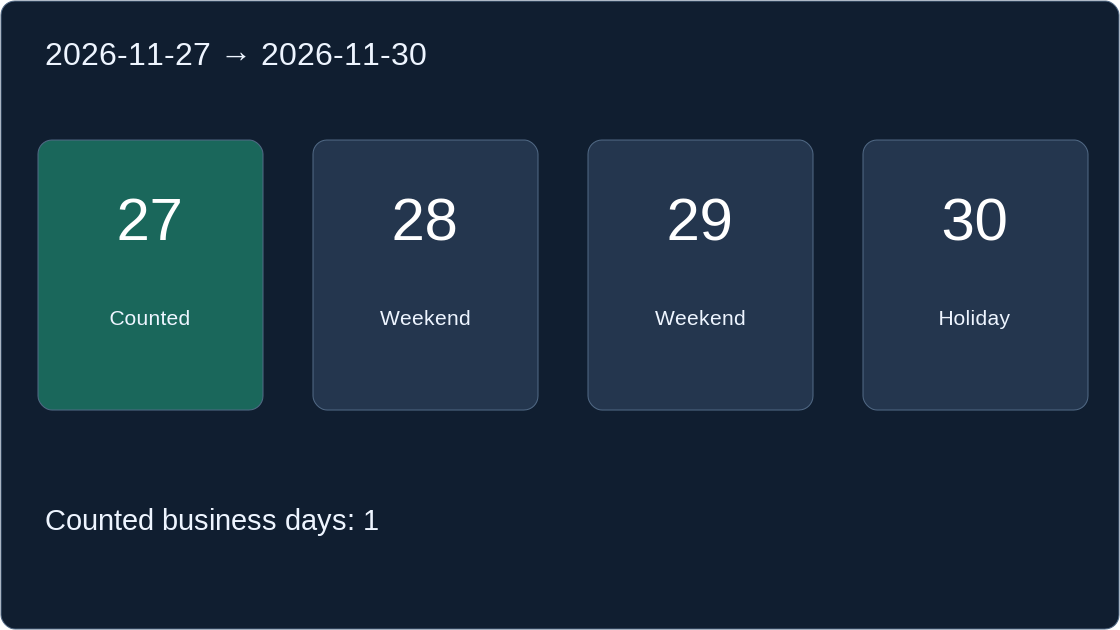
| Date | Reason |
|---|---|
| 2026-11-27 | Counted |
| 2026-11-28 | Weekend |
| 2026-11-29 | Weekend |
| 2026-11-30 | Holiday |
Write down whose calendar you mean
A business day depends on a chosen calendar. Here, Saturday and Sunday were weekends and the two closure dates were test inputs. We did not identify them as official holidays in a country. FrAIFlow does not automatically supply national, regional or employer holiday calendars in this workflow. Enter the dates that actually apply to your task.
You can select Saturday/Sunday, Friday/Saturday, a single weekend day or no weekend. Start and end inclusion are separate settings. This matters when one date is a handover day or when you are comparing a result with another calculator that excludes an endpoint by default.
Read the date rows, not only the total
In the example, Friday is counted. Saturday and Sunday are excluded as weekends, and Monday is excluded as a supplied closure date. Saturday also carries the holiday flag, but its exclusion is counted once. The JSON report preserves both facts; the visible reason uses a consistent priority rather than adding two exclusions for the same date.
The summary separately reports repeated holiday entries and dates outside the interval. These are input checks, not extra days to subtract. The CSV shows each date and its reason, while the JSON includes the boundary settings and calendar flags. If a result surprises you, find the disputed date in that list before changing the entire calculation.
Check a boundary with a smaller example
For a single weekday with no closure, including both boundaries counts one day. Excluding either boundary counts zero. For the Friday-to-Monday example, excluding Friday removes the only counted day after the sample closures are applied. This small test is easier to verify than trying to infer the endpoint rule from a large total.
The tool uses Gregorian calendar dates and UTC date arithmetic, not elapsed hours across time zones. It accepts at most 3,661 calendar dates in one interval. A daylight-saving change does not turn a counted date into a fraction of a day. Use a time-duration tool when you need hours, and verify applicable rules separately for statutory deadlines, payroll or contractual obligations. A transparent calendar calculation does not decide those rules for you.
Calendar-date counting in the Gregorian calendar. User-supplied weekends and holiday dates only; not a statutory deadline, payroll or public-holiday determination.