
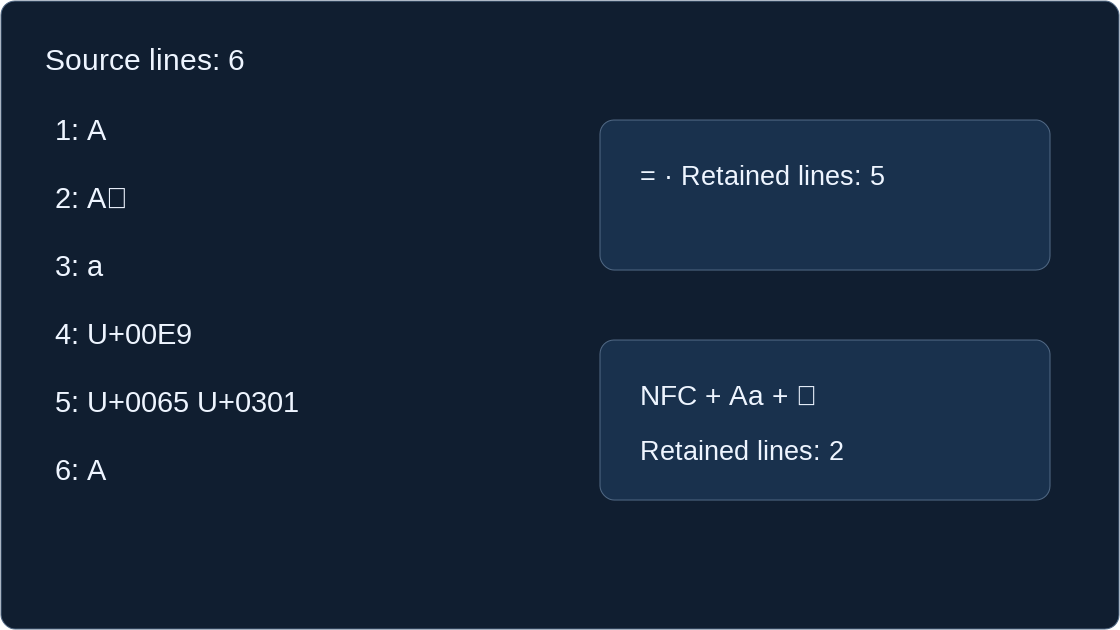
Two lines can look alike without being identical. Our six-line sample includes A, A followed by a space, lowercase a, two representations of é, and another A. Exact matching removes only the final A: five lines remain. Turning on trimming, case-insensitive comparison and NFC leaves two lines. Those are different decisions, not two ways of counting the same result.
| Retained source line | Removed source lines |
|---|---|
| 1 | 2, 3, 6 |
| 4 | 5 |
Choose what counts as a duplicate
The default compares complete original line content. A trailing space, letter case or a different Unicode representation can keep lines separate. The three optional settings change the comparison key. They do not rewrite the retained line, delete invisible characters or apply the broader NFKC substitutions that could change distinctions you need.
For the normalized sample, source lines 1, 2, 3 and 6 form one group, and lines 4 and 5 form another. Keeping the first occurrence retains source lines 1 and 4. The report lists each retained line and the source positions removed because they matched it. That map is more useful than a bare message saying four duplicates were removed.
Keep first or last without silently sorting
Choosing the last occurrence retains the original content of the last matching line. The output follows the source order of those selected occurrences; it is not sorted alphabetically. This can matter when a later line carries the spelling or surrounding whitespace you intend to preserve. Test the choice on a short sample before processing a long list.
Blank lines are also values in this workflow. A final newline is treated as a line ending rather than an extra empty record, and it is preserved when present. CRLF and lone CR endings are normalized to LF in the output. The report explicitly records whether line-ending normalization occurred, so a changed file hash is not mistaken for a mysterious content edit.
Check the output and keep a usable audit
The tool accepts up to 200,000 characters and 20,000 lines. The visible group table is limited to 100 groups; its JSON report contains the full detected map. That report stores line positions and settings, not the original line contents. The cleaned text is a separate TXT download with its own output hash.
Before replacing a source list, inspect several retained and removed positions, especially groups created by optional normalization. If different identifiers became one group, turn that option off and rerun from the original. Deduplication is a comparison policy you choose, not an automatic judgment that visually similar records are interchangeable. The published six-line fixture is small enough to verify every removal by hand.
The report records kept and removed source line numbers, not line contents. Optional transformations affect comparison keys only; no NFKC substitution or invisible-character deletion.