Why Base64 breaks non-English text
If btoa() handles Hello but fails on Korean text or emoji, the missing step is usually text encoding. Base64 represents bytes. A JavaScript string needs an agreed conversion to bytes first, and the receiving application must reverse that conversion.
One public report involved SVG markup containing non-Latin characters; another decoded GitHub API content but got a garbled trademark symbol. These are different ends of the same boundary. A successful atob() call returns a binary string, not automatically readable UTF-8 text.
Use a complete UTF-8 round trip
If you maintain the code producing the Base64, replace the text-to-binary boundary rather than removing the characters that trigger the error. These browser JavaScript helpers keep that boundary explicit. They are intended for reasonably small text payloads, not large uploads.
function encodeUtf8Base64(text) {
  const bytes = new TextEncoder().encode(text);
  let binary = "";
  for (const byte of bytes) binary += String.fromCharCode(byte);
  return btoa(binary);
}
function decodeUtf8Base64(encoded) {
  const binary = atob(encoded);
  const bytes = Uint8Array.from(binary, c => c.charCodeAt(0));
  return new TextDecoder("utf-8", {
    fatal: true, ignoreBOM: true
  }).decode(bytes);
}
const original = "Hello, 한글 ™ 🌍";
const encoded = encodeUtf8Base64(original);
const restored = decodeUtf8Base64(encoded);
console.log(encoded); // SGVsbG8sIO2VnOq4gCDihKIg8J+MjQ==
console.log(restored === original); // true
Put the helpers beside your existing conversion code, then test with the sample before substituting real content. The equality check should be true. If it is false, compare the strings before encoding and after decoding; do not judge success only from whether the output “looks like Base64.” Include an accented letter, an emoji and an empty string in the test set.
If you are only receiving data, ask what bytes the sender encoded. UTF-8 is not something the Base64 alphabet can tell you. A successful Base64 decode followed by a UTF-8 error may indicate another text encoding or a non-text file. For a PNG or PDF, preserve the decoded bytes as binary rather than running a text decoder over them.
In a user-facing tool, catch malformed-input errors and leave the original input available to edit. Do not replace a failed decode with a blank success result. Never paste private tokens into an unknown online converter: Base64 makes content portable, not secret.
Why ASCII-only tests miss the problem
Two decoder choices deserve attention: fatal: true rejects invalid UTF-8 instead of silently substituting replacement characters; ignoreBOM: true preserves a leading text marker. An unpaired UTF-16 surrogate is replaced by TextEncoder, so this is not a lossless transform for every possible JavaScript string.
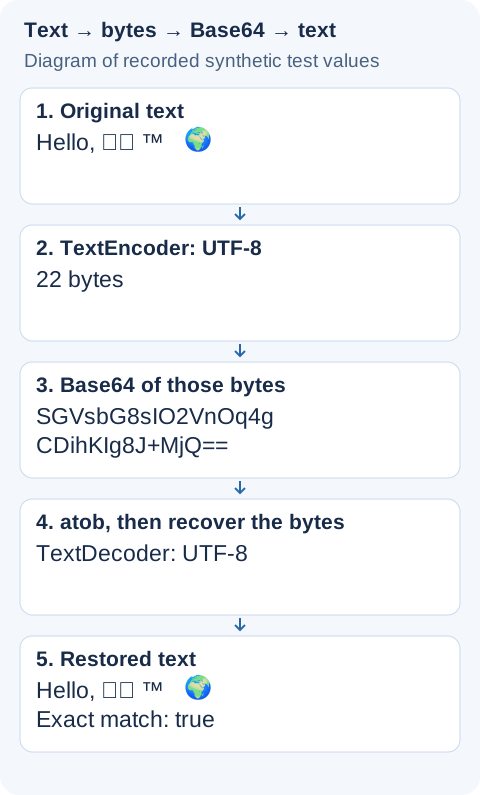
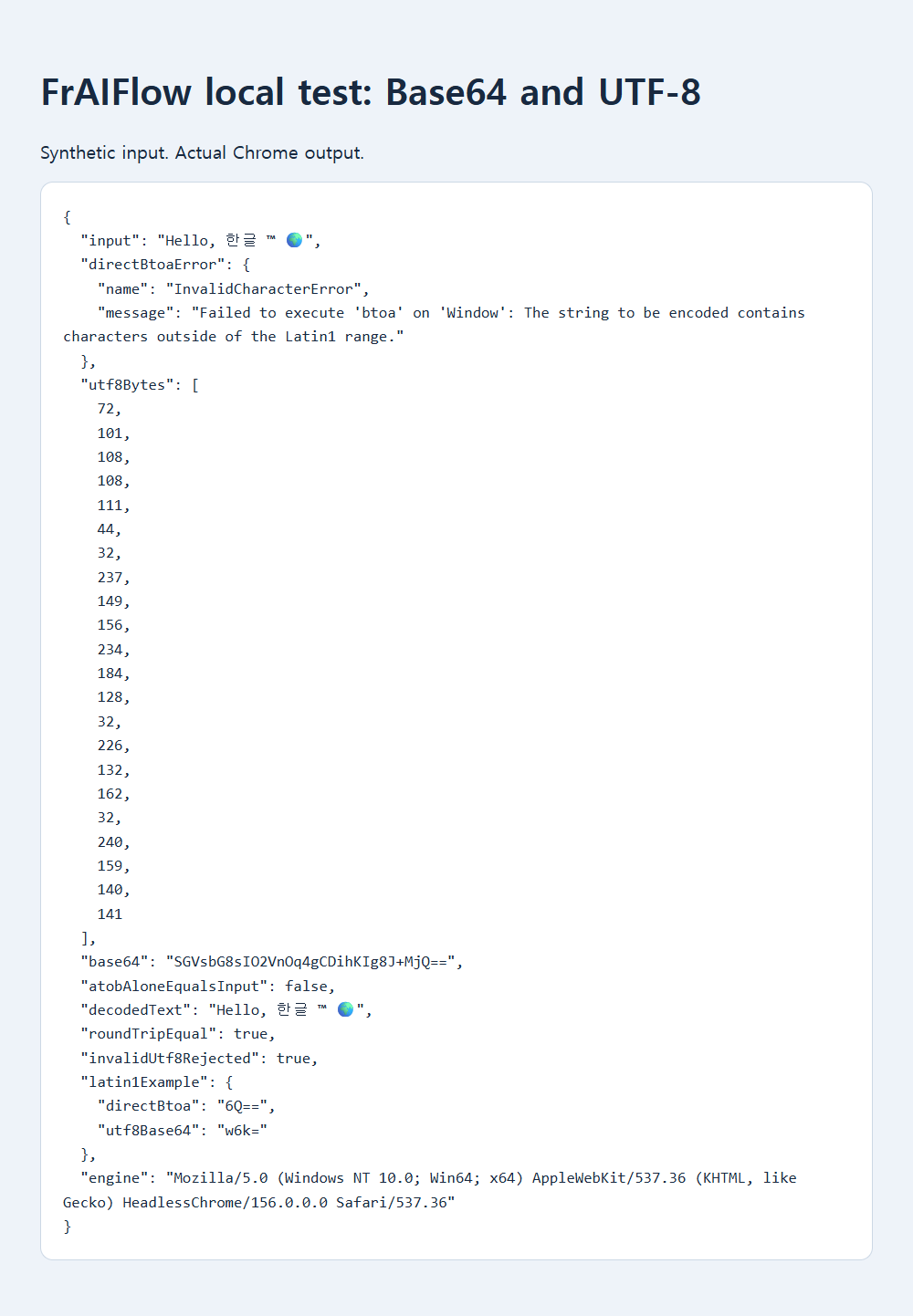
A saved local browser test used Hello, 한글 ™ 🌍. Direct btoa() threw InvalidCharacterError. TextEncoder produced 22 UTF-8 bytes, which encoded to SGVsbG8sIO2VnOq4gCDihKIg8J+MjQ==. Decoding those bytes as UTF-8 restored the exact sentence. This is a synthetic local test, not either reporter’s application.
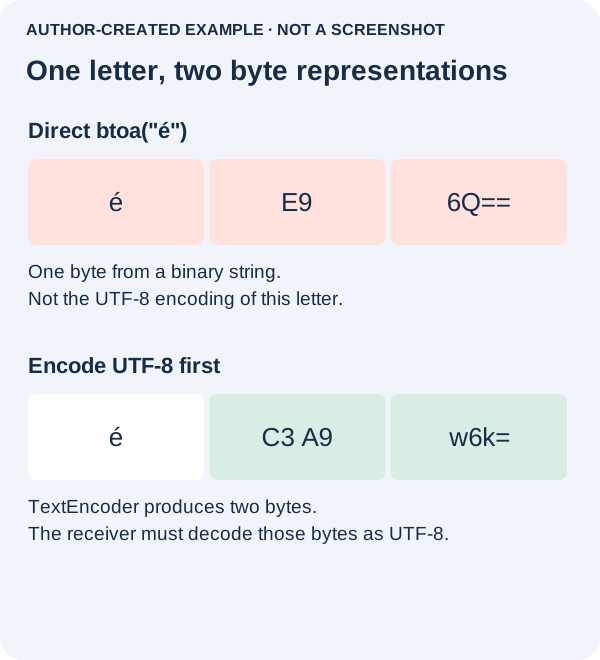
ASCII-only testing can conceal a bug. In the example, btoa("é") returned 6Q==, while UTF-8 encoding first returned w6k=. The first call did not throw, but its bytes are wrong for a receiver expecting UTF-8. Base64 itself carries no character-encoding declaration.
Decode and check the round trip
Base64 is neither encryption nor URL escaping. A plus sign can be interpreted specially in query parameters; follow the linked query-parameter guide. Avoid the deprecated unescape workaround, set practical payload limits, and never expose private content just to demonstrate an encoding error.
Sources, examples and further reading
- Public discussion: base64 encoding fails for non latin characters
- Public discussion: using javascripts atob to decode base64 doesnt properly decode utf 8 strings
- MDN reference: btoa
- Original supporting diagram
- Saved local test evidence
- MDN reference: TextEncoder
- MDN reference: atob
- MDN reference: TextDecoder
- MDN reference: ignoreBOM
- MDN reference: decode
- MDN reference: unescape
- Related guide: base64 query parameter
- Why valid-looking JSON fails at the first character
- Why identical-looking text fails to match